


I’ve been building Prototyper (an AI engineering tool) and working with AI coding assistants for over 2 years now. Claude Code, Droids, Cursor, Codex, I’ve tried them all. And I kept running into the same issues with each of them.
The tools and models are good. Surprisingly good. But my workflow was a mess.
The loop I couldn’t escape
Here’s what kept happening: I’d start a session, give Claude Code a bunch of context about my project, work on a feature for an hour, then close the laptop. Next day, new session. Claude has no idea what we did yesterday. So I paste in the same files. Explain the architecture again. Describe where we left off.
By the third day I’d lost track of what was actually done versus what I’d only talked about doing.
It got (much) worse when I started running multiple agents from different providers. One agent working on the backend, another on frontend. I’d juggle instruction files for claude, other agents, Cursor and so on. Of course, Claude Code couldn’t access Cursor plans, and Cursor couldn’t access Claude’s task list. They’d make conflicting decisions. One would refactor a function the other was depending on. Nobody told anybody anything because there was no way to tell anybody anything.
I spent more time managing context than writing code.
Why “better prompts” didn’t fix it
For months, I thought the answer was prompt engineering. I did a lot of research and I built elaborate system prompts. All why trying to get them to work with different models and different tools.
None of it addressed the core problem. Prompt engineering is about writing effective instructions. My problem was different: I didn’t have control over what context the model was seeing in the first place.
There’s a term floating around now called “context engineering” that describes this better. It’s about deciding what information goes into the context window, when it goes in, and how it’s structured. Anthropic has a good write-up on it. The Manus team wrote about their lessons too. The core insight is that as context length grows, models get worse at recalling information buried in the middle. Transformers compute relationships between every pair of tokens, so more context means more noise competing for attention.
Many of the recent innovations such as MCP can actually make this worse, because every MCP that you make available to Claude Code (or another agent) actually reduces your available context. And can significantly decrease the amount of tasks that you can get done before you’ll run into problems.
Reframing the problem
An engineer friend said something that reframed the problem for me: “You’re treating these things like magic oracles instead of junior developers.”
Junior developers need great onboarding docs. They need to know where to find things. They need a way to ask questions when they’re stuck. They need task descriptions that don’t assume context they don’t have.
I wasn’t giving the AI any of that beyond scattered markdown files, and agent instruction documents. So I spent some time coming up with a framework to solve this issue.
And I’m happy to say that after using this for about a month, my “agentic” engineering productivity has increased massively.
How I solved it: the three folder solution
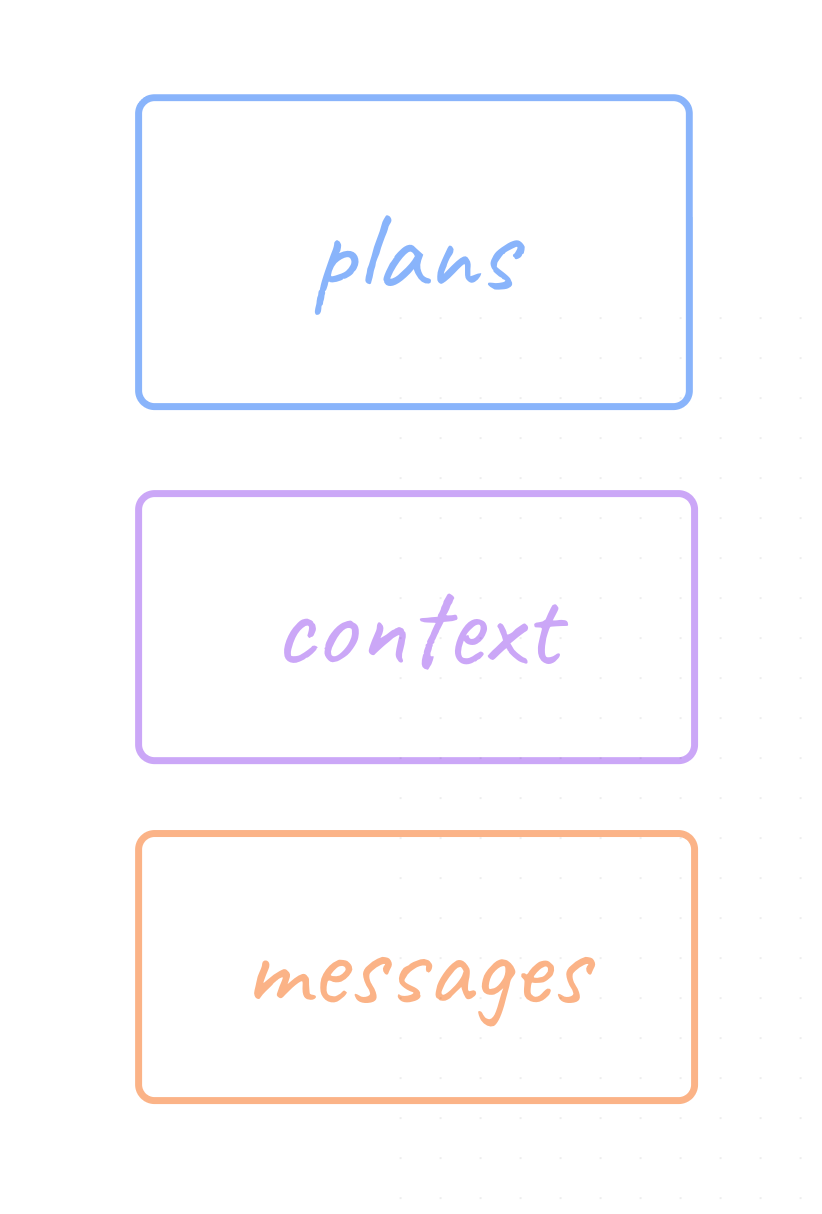
I decided that I wanted to give my agents access to three things: a shared context (where I can place screenshots, design files, etc), a centralised planning system and most importantly a way to communicate with each other. I solved that in this way:
`context/` is where I put everything an agent needs for the current task. Not the whole codebase. Just the relevant parts: the API spec for the endpoint I’m building, the database schema, the design mockup. Before an engineering session, I drag files in. The agent reads them. Now we’re looking at the same thing.
This is basically manual retrieval. Production AI systems do this automatically with vector databases and embeddings. But for a solo developer or small team, dragging files into a folder works fine and costs nothing. I also like how easy it is to swap things around, and the mental load of using this system is extremely low.
`plans/` solves the multi-session problem. Long-horizon tasks fall apart when context resets between sessions. The Manus team found that their agents average around 50 tool calls per task. That’s a lot of state to lose. What I noticed especially is that I’d already have APIs for certain tasks, but because there was no shared state it was a big trap for agents to recreate APIs because they were not aware of their existence.
My solution is very low-tech: each project gets a folder with a README explaining the goal and a series of numbered prompt files. Prompt 01, prompt 02, prompt 03. An agent runs one prompt, finishes, and the next session picks up at the next number. The numbered prompts act as checkpoints. They also force me to think through the approach before any code gets written.
`messages/` handles coordination between agents. When an agent hits a blocker, it writes a markdown file. Another agent (or me) reads it and responds. Delete the file when it’s resolved.
This is crude compared to how production systems handle inter-agent communication. But it works, and I can see exactly what’s happening by listing the directory.
Why files
Files are the lowest common denominator. Practically every AI tool can read files. Every human can read files. Git can track them. You can grep them. You can edit them with any text editor. It’s a way to make it possible to work with agents from any provider. Whether you like to run Claude Code and Codex, or Cursor and Droid, I can guarantee you that this setup is bullet-proof. It simply works.
Files also externalise memory. The Manus team talks about this: treating the filesystem as unlimited context that agents can read and write on demand. You can’t predict which piece of information will matter ten steps later, so you store everything and let the agent retrieve what it needs.
The filesystem is also reversible. You can drop detailed content while keeping a reference (a URL, a file path) that lets you retrieve it later. The context folder is just manual retrieval. But manual retrieval that I control.
And fourth: the cognitive load is very low. What I like about this system is how simple, yet powerful it is. You don’t have to understand RAG or semantic search. And don’t get me wrong, those tools are extremely powerful and useful. But sometimes, a simple foundation is the best.
What I learned
A few things became clear after using this setup for a while:
Simplicity is king. After many years as an engineer, I’m always surprised by how often it boils down to this. A simple system with very little cognitive overhead often outperforms a super complex over-engineered solution.
Explicit context beats implicit assumptions. When context lives in a folder, I know exactly what the agent sees. There’s no guessing about what it remembers from earlier in the conversation.
Structure prevents drift. Numbered prompts force sequential execution. Agent A does step 1, agent B does step 2. Nobody skips ahead. Nobody redoes work.
Errors should stay visible. I used to delete failed attempts to keep the context clean. Bad idea. When the agent sees that something failed, it updates its behaviour. The Manus team found the same thing: keeping error traces in context improves recovery.
Variation prevents loops. If I use the exact same prompt format every time, the agent falls into predictable patterns. Adding small variations in phrasing keeps it from going on autopilot.
What I’m still figuring out
The message system works but it’s clunky. Agents don’t naturally check for messages unless you tell them to. I’ve been adding “check /messages for any blockers” to my prompts, but it’s manual.
Plans work great for features I understand upfront. They’re less useful for exploratory work where I don’t know what the steps are yet.
And the whole thing assumes you’re comfortable with files and folders. If you’re building in an environment where that’s awkward (some cloud IDEs, for example), this might not fit.
Try it if you want
I put the template on GitHub because other people seemed to have the same problem. Clone it, and try building something with it using your agent of choice. I hope it works as well for you as it did for me!
And if you find ways to make it better, I’d like to hear about them.
The repo can be found here: Github
Further reading
- Context Engineering for AI agents) (Manus team)
- [Effective Context Engineering](Effective Context Engineering) (Anthropic)